

Overview
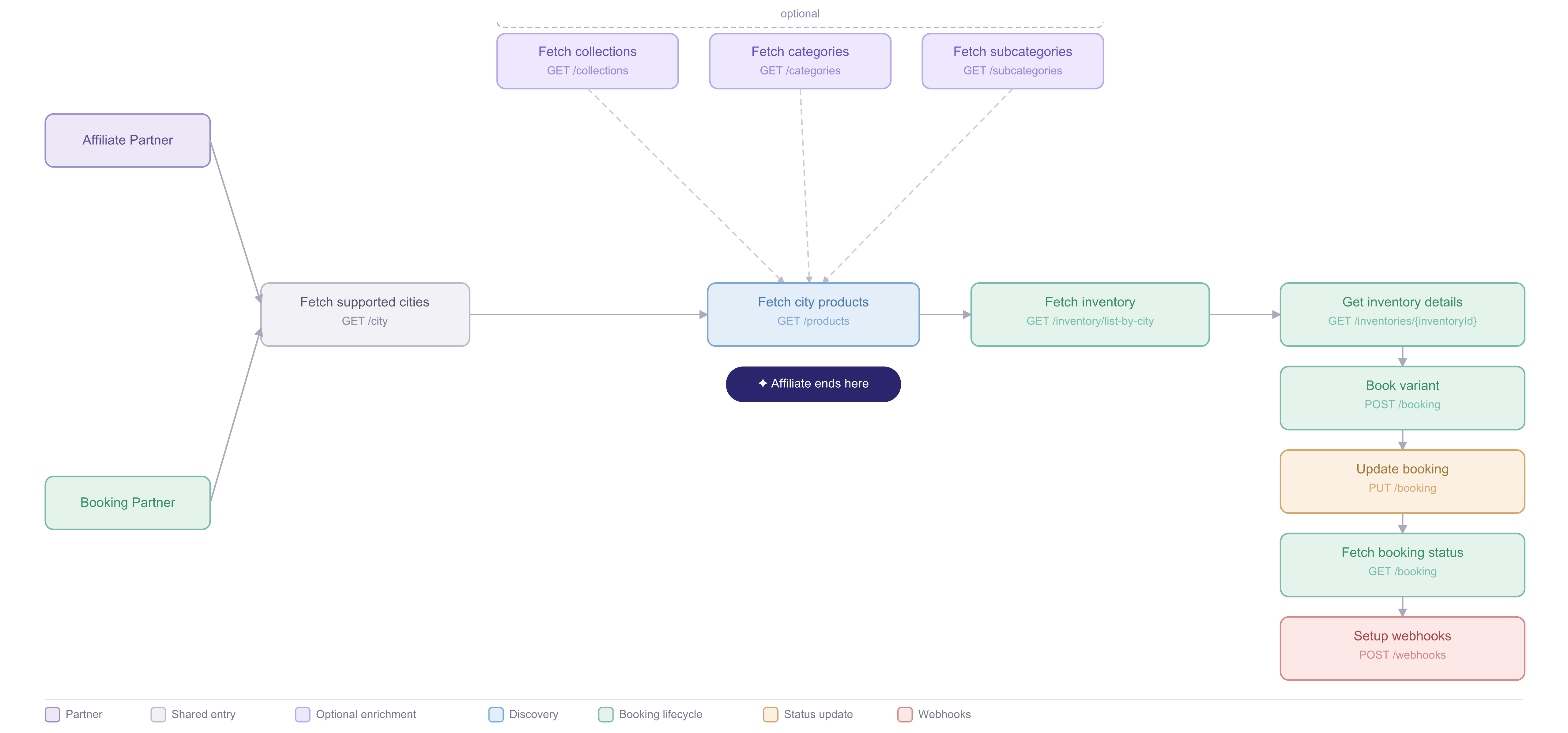
- Headout API for API Partner
- Headout API for Affiliates
The Get Product response includes an
inventorySelectionType field. Use it to determine which integration flow applies:NORMAL: Standard general-admission products (guided tours, timed-entry attractions, activities). Customer selects a date, variant, and optional time slot; no seat or section assignment required.SEATMAP: Products with specific seat selection. Customer picks individual seats from an interactive seatmap.SVG: Products with section-based seating. Customer selects a section; seat assignment is automatic.
- Normal flow
- Seatmap flow
- SVG flow
Discover what to sell
1
Discover supported cities
API: List CitiesStart by fetching the cities Headout supports. Each product is tied to a city.What you get: city code, city name, country, and coordinates.
2
Browse products for a city
API: List ProductsUse the city code to fetch the products available in that market. Filter by collection, category, currency, or language.What you get: product summaries, titles, pricing, media, and category metadata.
3
Subscribe to product events (optional)
API: Create event subscriptionInstead of relying solely on your regular catalog refresh, subscribe to
product.listing_status_changed to get notified the moment a product is listed or unlisted.What you receive: a signed webhook with the product ID and its new listing status. See Event subscription notification for the payload and signature verification.4
Open product details
API: Get ProductPull the full product record for variants, policies, media, and booking fields required later in the flow.What you get: variants, pricing tiers, input field definitions, cancellation and reschedule policies, and deep-link URLs.
Read each variant’s
inputFields carefully. They define the guest data you must collect before creating the booking.Check availability
1
Browse date-level availability
API: List availabilities - NormalFetch available dates and pricing for a specific variant within a date range. Use this to build a calendar or date picker before the customer selects a specific slot.What you get: available dates, availability status (
LIMITED, UNLIMITED, CLOSED), remaining count, and minimum pricing per date.remaining: 1000 is a sentinel value indicating unlimited availability.2
Subscribe to variant pricing changes (optional)
API: Create event subscriptionSubscribe to
product.variant_pricing_changed to get notified when a variant’s price moves for a near-term date (today, tomorrow, or the day after), instead of re-polling inventory to spot the change.What you receive: a signed webhook with the product ID, variant ID, and date whose price changed — then re-fetch the live price from List Inventory below. See Event subscription notification for the payload and signature verification.3
Check live slot inventory
API: List Inventory - NormalOnce the customer selects a date, fetch real-time slot inventory. Inventory is slot-based and can change quickly, so do not cache it.What you get: time slots, pax types,
netPrice, and headoutSellingPrice.Collect guest details
Don’t worry! The current integration continues to work as-is, with input fields from Get Product remaining valid for booking submissions. Only ~5% of slots have supplier-specific overrides that differ from the variant definition, and this step ensures those edge cases are handled correctly.
1
Fetch booking input fields for the selected slot
API: Get Inventory Details by IDOnce the customer picks a slot, fetch the exact input fields required for that inventory before rendering your booking form. Fields vary by inventory — common examples include pickup location, drop-off address, nationality, passport number, meal preference, hotel name, age, and weight.Pass the
id from the selected inventory as inventoryId.What you get: an inputFields array where each field carries a numeric id, a dataType (STRING, INT, ENUM, LOCATION, etc.), validation rules, and a level (PRIMARY_CUSTOMER or ALL_CUSTOMER).Use
level to decide which guests need each field: PRIMARY_CUSTOMER fields are collected once for the lead traveller only; ALL_CUSTOMER fields must be collected for every traveller in the booking.Create the booking
1
Create the booking
API: Create BookingSubmit the selected slot, guest details, and pax counts. The booking starts in
UNCAPTURED, then moves to PENDING after payment capture.What you get: a booking object with a bookingId and initial status.Keep the user updated
1
Track the booking status
APIs: Get Booking · List BookingsPoll the booking or listen for webhooks. When the booking reaches
COMPLETED, the ticket data is ready to show to the customer.Status progression: PENDING → COMPLETED / FAILED / CANCELLED2
Receive updates automatically
APIs: Create Webhook · Webhook PayloadRegister a webhook so status changes arrive automatically instead of relying on polling.What you receive:
bookingId, new status, and eventTimestamp.3
Change or cancel a booking
APIs: Cancel Booking · Reschedule BookingUse the booking policies returned by product details to decide whether a customer can change or cancel a booking.